Road construction

Road Base Calculator

Estimate the surface area and compacted base volume for a road, path, or driveway.

Project details

Enter road dimensions

Base layer
Base summary

Your estimate

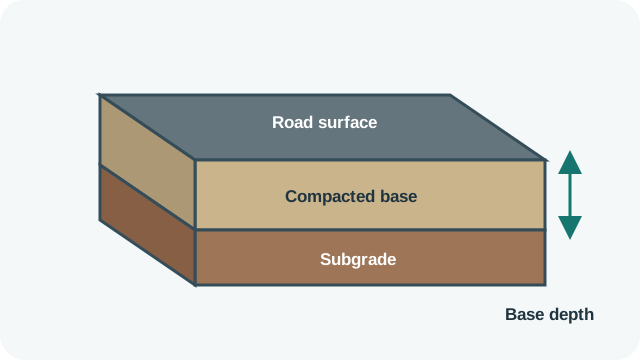
Road cross-section showing the surface, compacted base layer, and subgrade
Enter the compacted base depth. Loose material normally needs an additional compaction allowance.

Your base volume will appear here

Enter the road dimensions and compacted depth, then calculate the material volume.

What is Road Base?

The road base calculator finds the rectangular plan area and compacted geometric volume of one uniform layer. Width and length are converted to metres, depth is converted to metres, and the result is shown in square metres and cubic metres. It is useful for an early quantity check on a driveway, path, parking area or straight road section.

The result is not the amount of loose aggregate to order. Field levels vary, aggregate compacts, moisture and grading affect bulk volume, and real sites may taper, curve or contain separate depth zones. Use the project drawings, material specification and supplier conversion factors for purchasing.

How to Use This Calculator

  1. Measure the section’s width and length and select centimetres, metres or feet for each.
  2. Enter the finished compacted depth, selecting centimetres, feet or inches.
  3. Select Calculate. The tool converts all three dimensions to metres.
  4. Review plan area in m² and geometric volume in m³.
  5. For a nonuniform project, divide it into sensible sections, calculate each separately and add their volumes.

All dimensions must be greater than zero. The form assumes vertical sides, a level rectangular footprint and one constant finished depth.

Formula Used

Area (m²) = width (m) × length (m)
Volume (m³) = area (m²) × depth (m)

Conversions used include 1 ft = 0.3048 m, 1 in = 0.0254 m and 1 cm = 0.01 m. A purchase mass requires another step: mass = loose or compacted volume × applicable bulk density. The calculator does not assume a density or compaction factor.

Variables Explained

Input or outputMeaning
WidthAverage crosswise width of the rectangular section.
LengthLongitudinal distance of that section.
DepthSpecified finished compacted thickness of the base layer.
AreaHorizontal width multiplied by length, reported in square metres.
VolumeArea multiplied by depth, reported in cubic metres.
Compaction factorProject- and material-specific loose-to-compacted allowance not included by this form.

Worked Example

Consider a section 12 ft wide, 100 m long and 8 in deep. Convert width: 12 × 0.3048 = 3.6576 m. Convert depth: 8 × 0.0254 = 0.2032 m.

Area is 3.6576 × 100 = 365.76 m². Volume is 365.76 × 0.2032 = 74.322432 m³, displayed as 74.322 m³.

This is the compacted rectangular geometry. If a supplier provides a documented loose-volume factor of 1.20 for the specified material and process, a separate planning calculation would be 74.322432 × 1.20 ≈ 89.19 loose m³. Do not borrow that example factor for a real order.

Why Use This Calculator?

Area helps with geotextile, grading or coverage checks. Volume describes the finished rectangular layer. Neither number identifies aggregate type, gradation, strength, moisture, density, number of lifts or required compaction. Those come from the pavement design and specifications.

Survey irregular sections rather than relying on one maximum width. For a tapered width, a reasonable geometric method may use an average width when the taper is simple; complex shapes need sectional or survey-based quantities. Soft spots, over-excavation and level corrections can add material beyond design geometry.

Suppliers may sell aggregate by mass. Convert volume using a bulk density that matches the material’s moisture and loose or compacted condition. Include only justified waste and compaction allowances. For public roads or structural pavement work, quantities do not replace engineering, drainage, subgrade and quality-control requirements.

Check the calculation against delivery capacity and construction staging. A correct total may still need to be divided among several lifts, work areas or delivery days.

Common Mistakes

  • Reading cubic metres as square metres; volume requires the third dimension.
  • Entering 8 inches while leaving the depth selector at centimetres.
  • Ordering exactly the compacted geometric volume as loose aggregate.
  • Applying a generic density to a supplier’s different gradation or moisture condition.
  • Using one rectangle for changing widths and depths without checking sections.
  • Adding an allowance twice when a supplier conversion already includes compaction.
  • Using the estimate as a pavement-design thickness recommendation.

Frequently Asked Questions

Does the result include compaction?

It gives finished geometric volume. Apply a project-specific loose-to-compacted conversion from the specification or supplier when ordering.

Why are area and volume different units?

Area covers the two-dimensional footprint in m². Multiplying by depth adds a third dimension, producing volume in m³.

Can I use feet for width and metres for length?

Yes. Each selector is converted independently before multiplication, provided every selector matches the number entered.

How do I handle a changing road width?

Split the project into sections or use an appropriate surveyed average for a simple taper, then add the section volumes.

Does the calculator convert cubic metres to tonnes?

No. That requires a material bulk density and condition that the form does not ask for.

Should depth be loose or compacted depth?

Use the finished compacted design depth for geometry, then account for placement and compaction separately.

Does this determine a safe base thickness?

No. Thickness depends on loading, subgrade, drainage, materials and design standards; use the approved project specification.

Sources & References