Mathematics calculator

Big Number Calculator

Add, subtract, multiply, or divide decimal numbers without converting large integer results to floating point.

Calculator inputs

Enter your values

Arbitrary precision
Use plain decimal notation without commas or scientific notation.
Calculated output

Result summary

Your result will appear here

Complete the required fields and select the calculate button.

Long decimal numbers aligned by place value for arithmetic
Keeping the result as a decimal string avoids losing adjacent large integer values.

What is Big Number Calculator?

This calculator performs addition, subtraction, multiplication or division on two decimal numbers using decimal-string arithmetic. Large integer results remain written exactly instead of being converted to floating point, so adjacent values beyond the ordinary floating-point safe-integer range stay distinct.

Division needs a finite display limit because many quotients repeat forever. The calculator returns up to 100 decimal places without rounding a repeating tail. For regulated financial reconciliation, cryptographic work or other high-stakes calculations, still verify the inputs and result with the system required for that task.

How to Use This Calculator

Enter the first number, choose an operation, and enter the second number. Use plain decimal notation without commas, currency symbols or expressions. The text fields accept a number as text, but the backend expects a numeric decimal string rather than a sentence or a formula.

Choose Calculate and read the result. Addition and multiplication give the same mathematical answer when operands are exchanged. Subtraction and division depend on order: the first number is the starting value or dividend, and the second is the subtracted amount or divisor.

Do not use zero as the second number for division. The controller returns a division-by-zero message in that case. A zero first number divided by a nonzero second number is valid and gives zero. These superficially similar inputs have different mathematical meanings.

Formula Used

Addition: a + b. Subtraction: a − b. Multiplication: a × b. Division: a ÷ b, for b ≠ 0. Addition, subtraction and multiplication preserve the entered decimal scale up to 100 places; division returns at least 20 and at most 100 decimal places.

Variables Explained

InputFormatMeaning
First numberPlain decimalFirst operand; dividend for division.
Operation+, −, × or ÷The arithmetic relationship to apply.
Second numberPlain decimalSecond operand; it must be nonzero when used as a divisor.

The operands are numbers, not expressions. Entering 2+3 in one field does not request a nested calculation. To combine operations, calculate them in the intended order.

A minus sign on an operand is distinct from selecting subtraction: subtracting a negative number adds its magnitude. Decimal points represent fractional place values. The calculator keeps integer output exact and preserves as much entered decimal scale as the supported 100-place limit allows.

Worked Example

For a large product, 1,000,000,000 × 1,000,000,000 is 1,000,000,000,000,000,000. Enter the operands without separators and the result remains a complete decimal integer.

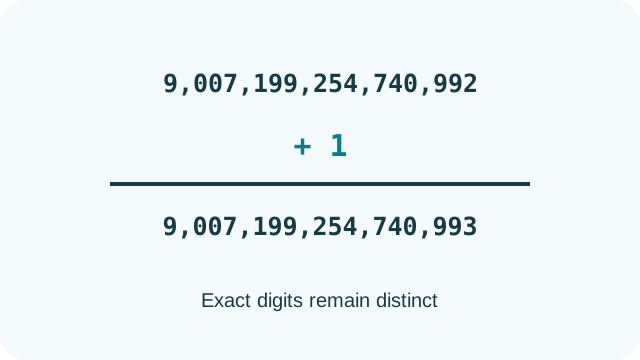
For an exact-digit test, 9,007,199,254,740,992 + 1 equals 9,007,199,254,740,993. Ordinary double-precision floating point cannot distinguish every adjacent integer at that scale, but this calculator keeps the operands and answer as decimal strings.

For a decimal example, 1 ÷ 3 repeats indefinitely. The displayed result therefore ends after the configured decimal scale. That truncated decimal is an approximation of one third even though the requested division is mathematically exact.

Why Use This Calculator?

Start by checking the approximate magnitude. A product of two numbers around a billion should be around a quintillion. A subtraction of almost equal large values should be much smaller than either input. These checks can catch misplaced zeros or an incorrect operation.

The page intentionally uses plain decimal notation rather than scientific notation. This keeps every returned integer digit visible, but very large answers can be long. Count place values carefully when copying them.

Addition, subtraction and multiplication can produce exact terminating decimal answers from terminating decimal inputs. Division can produce a repeating expansion, so a displayed quotient that reaches the decimal limit should be treated as truncated. Retain the source operands when another system must reproduce the calculation.

Common Mistakes

Do not paste comma-separated numbers, currency symbols or scientific notation into the fields. Plain decimal strings are the intended format. Keep operand order in mind for subtraction and division.

A repeating division result is necessarily cut off at a finite decimal place. Feeding that truncated quotient into the inverse operation may not recover every original digit, even though exact integer and terminating-decimal operations are preserved.

Frequently Asked Questions

Is this an arbitrary-precision output tool?

Yes for the supported plain-decimal operations. Integer results and terminating decimal results remain decimal strings. Repeating division results still require a finite display limit.

Why does the result use an exponent?

This calculator returns a plain decimal string rather than scientific notation. That makes every stored digit visible, although an especially large answer can extend across many places.

Can I divide by a decimal?

Yes, when it is a valid plain decimal and nonzero. For example, 10 ÷ 0.25 is 40. A repeating quotient is truncated at the calculator’s decimal-place limit.

Why is a subtraction negative?

The selected operation subtracts the second number from the first. If the second exceeds the first, the result is negative. Swapping them changes the sign rather than preserving the same answer.

How should I verify important final digits?

Use an independent decimal or integer method that retains values as arbitrary-precision strings through display. Compare exact operands and the operation, rather than relying on two floating-point tools that may share the same limitation.

Sources & References