Angle Cut Calculator

Form

%

Results

Knee side (aₚ)

0

Knee side (bₚ)

0

Outer distance (B)

0

Inner distance (b)

0

1

What is Angle Cut?

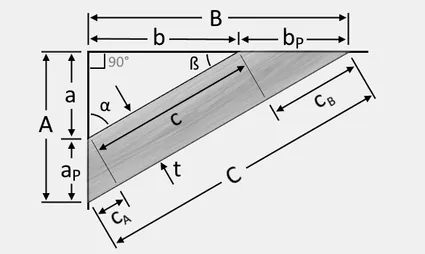
This angle-cut calculator evaluates a specific trigonometric model from three lengths: plank thickness, an outer-part distance and an inner-part distance. It returns two projections and two offsets, labelled as outer and inner distances and knee measurements. The labels should be matched to your drawing before the output is used to mark material.

The calculation is not a general-purpose mitre-saw angle tool. It defines an internal angle as arcsin(inner distance divided by outer distance), then uses that angle in four length expressions. Two projects with different geometric definitions can use the same words for their dimensions while needing different formulas. Understanding this model is therefore more useful than copying a result solely because the page title sounds appropriate.

2

How to Use This Calculator

  1. Draw or inspect the intended geometry and identify the three measurements represented by thickness t, outer distance A and inner distance a. Check that the lengths actually fit this page’s equations.
  2. Enter a positive thickness and choose its length unit. The supported inputs are centimetres, inches, metres and feet.
  3. Enter the outer and inner distances with their own units. They are converted to centimetres before the ratio and projections are evaluated.
  4. For the ordinary positive-length model, keep 0 < a < A. The endpoints create singular or degenerate geometry; a value above A makes the inverse sine invalid.
  5. Calculate and read all four outputs in centimetres. The tool rounds them to two decimal places. Convert units separately if the drawing or marking tools use another scale.
3

Formula Used

θ = arcsin(a/A). Outer projection = A cos θ; inner projection = a cos θ. Knee a = t/tan θ; knee b = t tan θ. All entered lengths are converted to centimetres before calculation.
4

Variables Explained

InputMeaning in this calculator
Plank thickness, tThe thickness used in both offset formulas. It scales the two knees but does not determine θ.
Outer part distance, AThe denominator of the a/A ratio and the length used for the outer cosine projection. It must be nonzero.
Inner part distance, aThe numerator of the a/A ratio and the length used for the inner cosine projection.
Unit dropdownsIndependent length-unit declarations. One inch becomes 2.54 cm, one foot 30.48 cm and one metre 100 cm.
Output labelsNames for the four expressions in this implementation. The calculation returns lengths, not a saw setting or a complete drawing.
5

Worked Example

Enter t = 2 cm, A = 10 cm and a = 5 cm. The ratio a/A is 0.5, so θ = arcsin(0.5) = 30°. The outer projection is 10 cos 30° = 8.6603 cm and the inner projection is 5 cos 30° = 4.3301 cm. Their displayed values are 8.66 cm and 4.33 cm.

For the offsets, tan 30° is approximately 0.57735. Knee a is 2/0.57735 = 3.4641 cm, displayed as 3.46 cm. Knee b is 2 × 0.57735 = 1.1547 cm, displayed as 1.15 cm. If thickness alone is doubled to 4 cm, the two projections stay unchanged while both knees double. If every input length is doubled, all four output lengths double and the internal angle stays at 30°.

6

Why Use This Calculator?

The ratio a/A controls the angle, while thickness controls the size of the offsets. This separation helps you check whether the output responds sensibly to a changed measurement. The projections also satisfy outer projection/inner projection = A/a when the values are nonzero, because both use the same cosine factor.

Near the ends of the allowed ratio, small measurement changes can create large offset changes. As a/A approaches zero, tan θ approaches zero and t/tan θ becomes very large. As a/A approaches one, θ approaches 90° and t tan θ grows very large. Those are geometric consequences, not useful assurances that a physical joint is buildable. The calculation excludes saw kerf, blade setup, material movement, tolerances and structural design. Check the drawing and a suitable test piece before transferring a calculated length to final material.

7

Common Mistakes

    • Do not enter face width as thickness unless the chosen geometry explicitly uses it in the t position.
    • Do not use a larger inner distance than outer distance. The real-valued inverse sine requires a ratio between −1 and 1, and ordinary positive lengths use the narrower range stated above.
    • Do not assume the output follows the input unit. Every returned length is labelled cm.
    • Do not interpret the internal arcsine angle as a verified saw-scale reading; tool conventions may measure a complementary angle.
8

Frequently Asked Questions

Can I mix inches and centimetres in the inputs?

Yes, provided each dropdown correctly states the unit of its own value. The controller converts them to centimetres before calculating. For example, 1 inch and 2.54 centimetres represent the same thickness and should produce the same offsets when the other inputs are unchanged.

Why does a zero inner distance cause trouble?

It makes θ zero and tan θ zero. The knee-a expression divides thickness by that tangent, so it cannot produce an ordinary finite offset. Use a nondegenerate geometry rather than relying on the form to return a usable answer for this endpoint.

Does this include material lost to the blade?

No. The four formulas are ideal geometric expressions. There is no kerf-width input and no allowance for trimming, sanding or setup error. A cutting list may need those adjustments independently, depending on how the dimensions are defined.

Why are both outputs called projections multiplied by cosine?

That is how this page’s controller defines them: it applies the same cos θ factor to A and a. They are not automatically the two legs of one right triangle. Use those explicit definitions to decide whether the model matches your sketch.

Should I mark to the nearest hundredth of a centimetre?

Two decimal places describe the display rounding, not the accuracy of the measurements or cutting process. A calculated 8.66 cm may come from much less precise inputs. Choose practical marking precision from the drawing, material and tools rather than the number of displayed digits.

9

Sources & References